


Tackling repetitive strain injury head-on means combining a few key things: getting your workspace set up ergonomically, working a bit smarter, and making sure you move and stretch throughout the day. If you're proactive about how you work, you can dramatically cut down on the physical stress that leads to this seriously debilitating condition.
Why You Can't Afford to Ignore RSI Prevention

Before we get into the nitty-gritty of workstation setups and specific stretches, let's be clear about what’s really at stake here. Repetitive Strain Injury (RSI) isn't just a fleeting ache or some minor inconvenience. It's a progressive and painful condition that affects thousands of workers across the UK, often leading to chronic pain, limited mobility, and a lot of time off work.
Ignoring those early whispers of a problem—that slight tingle in your fingers or a dull ache in your shoulder—is a huge gamble. Over time, those subtle signals can snowball into severe pain that doesn't just mess with your job, but your entire quality of life. Suddenly, simple things like opening a jar, holding a book, or even playing with your kids become a painful ordeal.
The Real-World Impact on People and Businesses
The fallout from RSI goes far beyond personal discomfort. For businesses, the impact shows up in lost productivity, rising absenteeism, and some very real financial costs. To get a clearer picture of the scale of the problem in the UK, let's look at the numbers.
RSI at a Glance: Key UK Statistics
| Statistic | Figure | Implication for Workers and Employers |
|---|---|---|
| Annual Business Cost | Nearly £300 million | This staggering figure covers sick pay, overtime for other staff, and lost production, making prevention a clear financial priority. |
| Working Days Lost | 5.5 million (2022/23 for work-related musculoskeletal disorders) | Each lost day represents a disruption to workflow and a period of suffering for an employee. |
| Average Time Off | 15.2 days per case | This is a significant recovery period, highlighting the severity of these conditions and the impact on both individual income and team stability. |
These figures show that RSI and related musculoskeletal disorders aren't just an HR issue; they're a major operational and financial challenge.
This is precisely why understanding how to prevent repetitive strain injury isn't just a 'nice to have'—it's a critical business strategy. Taking proactive steps is the best way to protect your most important asset: your people.
For a skilled worker, RSI can prematurely end a career they’ve spent years mastering. For a business, it’s a needless loss of talent, experience, and momentum. The motivation to act should be crystal clear for everyone.
Moving From Awareness to Action
The best part? RSI is largely preventable. By getting to grips with the risks and committing to small, consistent changes, you can build a much safer and more sustainable work environment. This guide is all about moving beyond the textbook definitions and giving you practical, real-world solutions.
Think of these steps as an investment in your long-term health and your career. Following the right procedures is a core part of maintaining workplace safety compliance.
The rest of this guide will walk you through actionable advice, from ergonomic tweaks to simple daily stretches, empowering you to take back control of your well-being on the job.
Building an RSI-Proof Workstation
Your workstation is command central. It's where the work gets done, but it can easily become the source of serious physical strain. Getting your setup right isn't about splashing out on expensive gear; it’s about making smart, deliberate adjustments that support your body's natural posture. This is your first and most powerful line of defence against RSI.
The aim here is to find a neutral posture. This is where your joints are naturally aligned, and your muscles are relaxed, not tensed up. Think of it as finding your body’s ‘at rest’ position, even while you’re busy working. Getting this right eliminates those tiny, constant muscle contractions and awkward joint angles that, over time, snowball into major issues.
Let’s get past the generic advice and into the nitty-gritty of what you can do today to turn your workspace into a fortress against RSI.
Your Chair Is the Foundation
It all starts with how you sit. Your chair is the anchor for your entire posture, dictating the position of your hips, spine, and shoulders. If your chair is wrong, you're fighting an uphill battle from the get-go, forcing other parts of your body to compensate.
First, get the height right. Your feet should be flat on the floor, with your knees bent at roughly a 90-degree angle, either level with or just slightly below your hips. If your feet are dangling, grab a footrest. If your knees are pointing up towards your chest, you need to raise the chair.
Good back support is non-negotiable. The curve of your lower back needs to be right up against the chair’s lumbar support. This helps maintain the natural ‘S’ shape of your spine and stops you from slumping forward—a habit that puts a massive strain on your neck and shoulders.
A classic mistake is to adjust your chair to fit the desk. Always do it the other way around. Set up your chair for your body first, then adjust everything else to match that ideal position.
Aligning Your Monitor and Keyboard
Once you're seated correctly, it's time to position your essential tools. The wrong monitor and keyboard placement will force your neck and wrists into stressful, unnatural angles for hours on end.
Monitor Placement
Your monitor needs to be directly in front of you, not off to one side where you have to constantly twist your neck. The top of the screen should be at or just a fraction below your eye level. This simple adjustment lets you look straight ahead with a relaxed neck, instead of craning it up or down.
- Distance: A good rule of thumb is to place the monitor about an arm's length away. This stops you from squinting because it’s too close or leaning in because it’s too far.
- Height Check: Here’s a quick test. Close your eyes for a few seconds. When you open them, your gaze should naturally land on the top third of the screen. If not, use a proper monitor stand or even a stack of sturdy books to get it to the right height.
Keyboard and Mouse Position
The goal for your keyboard and mouse is to keep your wrists straight and your elbows tucked in close to your body, bent at a comfortable 90-degree angle.
Stop reaching for your mouse or stretching for your keyboard. That extension creates a cascade of tension that travels right up your arm into your shoulder and upper back. If your desk is too high to achieve this comfortably, a keyboard tray is a brilliant investment. It lets you bring your keyboard and mouse lower and closer, helping you maintain that all-important neutral wrist posture.
The Rise of the Standing Desk
Standing desks are a fantastic way to break up long periods of sitting, but they aren’t a silver bullet. Standing rigidly for eight hours just swaps back pain for sore feet, legs, and hips. The real magic is in the movement and variation.
The key is to alternate between sitting and standing. A good place to start is the 30-30 rule: sit for 30 minutes, then stand for 30 minutes. Just remember that all the same ergonomic rules apply when you’re standing.
- Elbows at 90 degrees: Adjust the desk so your elbows are still at a right angle with straight wrists when you type.
- Monitor at eye level: You’ll almost certainly need to raise your monitor when you stand up.
- Use an anti-fatigue mat: These cushioned mats are a game-changer. They encourage tiny, subconscious movements in your legs, which is great for circulation.
For those of us in industrial or workshop settings, the principles are identical, even if the equipment looks different. An adjustable-height workbench offers the same flexibility, allowing you to set the perfect height whether you're sitting on a stool for detailed work or standing for assembly. This adaptability is vital for preventing the back and shoulder strain that comes from hunching over a fixed-height surface all day. You can learn more about finding the right adjustable height workbench to match your specific tasks.
Ultimately, creating an RSI-proof workstation is an ongoing conversation with your body. It's about paying attention to the signals it sends you and making small, consistent adjustments to build an environment that works for you, not against you.
Adopting Smarter Work Habits and Techniques

Even with the most perfectly engineered workstation, you're only halfway there. The truth is, how you actually do your work—the way you move, the force you apply, the rhythm of your day—is just as critical as the physical setup. This is where we need to shift our focus from the equipment to our own actions.
The foundation of preventing RSI is maintaining a neutral posture. This doesn't mean sitting bolt upright like a soldier. It's about finding that relaxed, natural alignment where your muscles aren't constantly fighting to hold a position.
Think about your wrists. They should be straight, not bent up, down, or sideways when you're using a tool or a keyboard. Your neck should flow in a natural line from your spine, not jutting forward to peer at a screen. It’s these tiny, seemingly harmless misalignments, repeated thousands of times a day, that cause the micro-damage that eventually leads to serious injury.
Weaving Movement and Rest into Your Workflow
Our bodies are built to move, not to be locked into one position for hours on end. The secret to countering the strain from repetitive tasks is to build regular movement directly into your daily routine, making it as non-negotiable as your morning cuppa.
A fantastic method for this is the Pomodoro Technique. It’s usually seen as a productivity hack, but it’s brilliant for physical well-being. The idea is dead simple: work in focused 25-minute bursts, then take a mandatory 5-minute break.
During that break, don't just reach for your phone. Get up. Walk around the workshop, stretch your hands and wrists, roll your shoulders. These frequent "micro-breaks" do far more to fight off muscle fatigue and boost circulation than one long lunch break ever could.
The scale of this issue is immense. The Labour Force Survey for 2020/21 showed that an estimated 470,000 workers in Great Britain were suffering from work-related musculoskeletal disorders, a category that includes RSI. Of those, around 212,000 cases involved the upper limbs or neck—the exact areas we're talking about.
Breaking Those Common Bad Habits
Over time, we all pick up little unconscious habits, and many of them are direct contributors to RSI. The first step is to spot them, then consciously replace them with better techniques. It takes effort at first, but it quickly becomes second nature.
Here are a few common culprits I see all the time:
- The 'Death Grip' on a Mouse or Tool: So many people clench their mouse or screwdriver with far too much force without even realising it.
- The Fix: Make a conscious effort to relax your grip. Your hand should rest lightly on the mouse. When you're using a hand tool, use only the force needed to get the job done safely. No more, no less.
- Heavy-Handed Typing: Pounding the keyboard sends shockwaves right up your fingers into your wrists and elbows.
- The Fix: Practise typing with a lighter touch. Modern keyboards are incredibly sensitive; they don't need to be hammered. This one change can dramatically reduce the cumulative impact on your finger joints.
- Resting Wrists on the Desk Edge: Using the desk or a hard wrist rest as a pivot point is a classic mistake. It compresses the delicate nerves and tendons in your wrist—right where the carpal tunnel is.
- The Fix: Learn to keep your wrists "floating" in a neutral, straight line from your forearm to your hand. If you must use a wrist rest, it's for supporting the heel of your palm during pauses, not for anchoring your wrist while you type.
Here’s a quick self-check you can do right now. Look down at your keyboard. Are your wrists anchored while your fingers do all the work? Try to use your whole arm to move your hands across the keyboard, keeping your wrist and hand in one stable line. This small change spreads the effort, taking the strain off those tiny, vulnerable joints.
Finally, take a look at your immediate workspace. Are your most-used tools and parts within easy reach? Constant stretching and awkward leaning add up. This is a core principle of workshop efficiency, and it's why maximising efficiency with workshop drawers not only saves time but also saves your body from unnecessary strain. By adopting these smarter techniques, you can transform your daily routine from a source of wear and tear into a system that actively protects you.
Simple Stretches to Counteract Daily Strain
Getting your workstation set up ergonomically is a crucial first line of defence against RSI, but it’s a passive one. The real game-changer is active prevention, which is all about building resilience in your body. Think of your daily work routine like a long workout; if you don't cool down properly, your muscles get tight, stiff, and become prime candidates for injury. Simple, targeted stretches are that cool-down, designed to undo the tension that builds up in your hands, wrists, and shoulders all day long.
We're not talking about a full-on gym session here. Just integrating a few key movements into your day is a powerful way to boost circulation, release that knotted-up feeling, and maintain flexibility where you need it most. It's these small, consistent actions that make a massive difference to your long-term joint and muscle health.
Why You Can't Afford to Skip Stretching
When you're doing the same task over and over, certain muscle groups stay tensed up for hours at a time. This constant contraction can squeeze blood vessels, restricting flow and leading to a build-up of metabolic waste. That's what causes that familiar stiffness and aching you feel at the end of a long day.
Stretching essentially hits the reset button. It gently lengthens those overworked muscle fibres, allows fresh, oxygenated blood to flood the area, and helps flush out the toxins that make you sore. It's a simple, direct fix for the root causes of strain before they have a chance to become a full-blown injury.
Think of it like this: A rubber band that’s always held taut eventually goes brittle and snaps. But if you regularly stretch and release it, it stays elastic and strong. Your muscles and tendons work in much the same way.
Before diving into any stretching routine, it’s vital to get the basics of ergonomics right. Your setup is the foundation for everything else. This visual guide is a great reminder of the three core steps for any workstation.
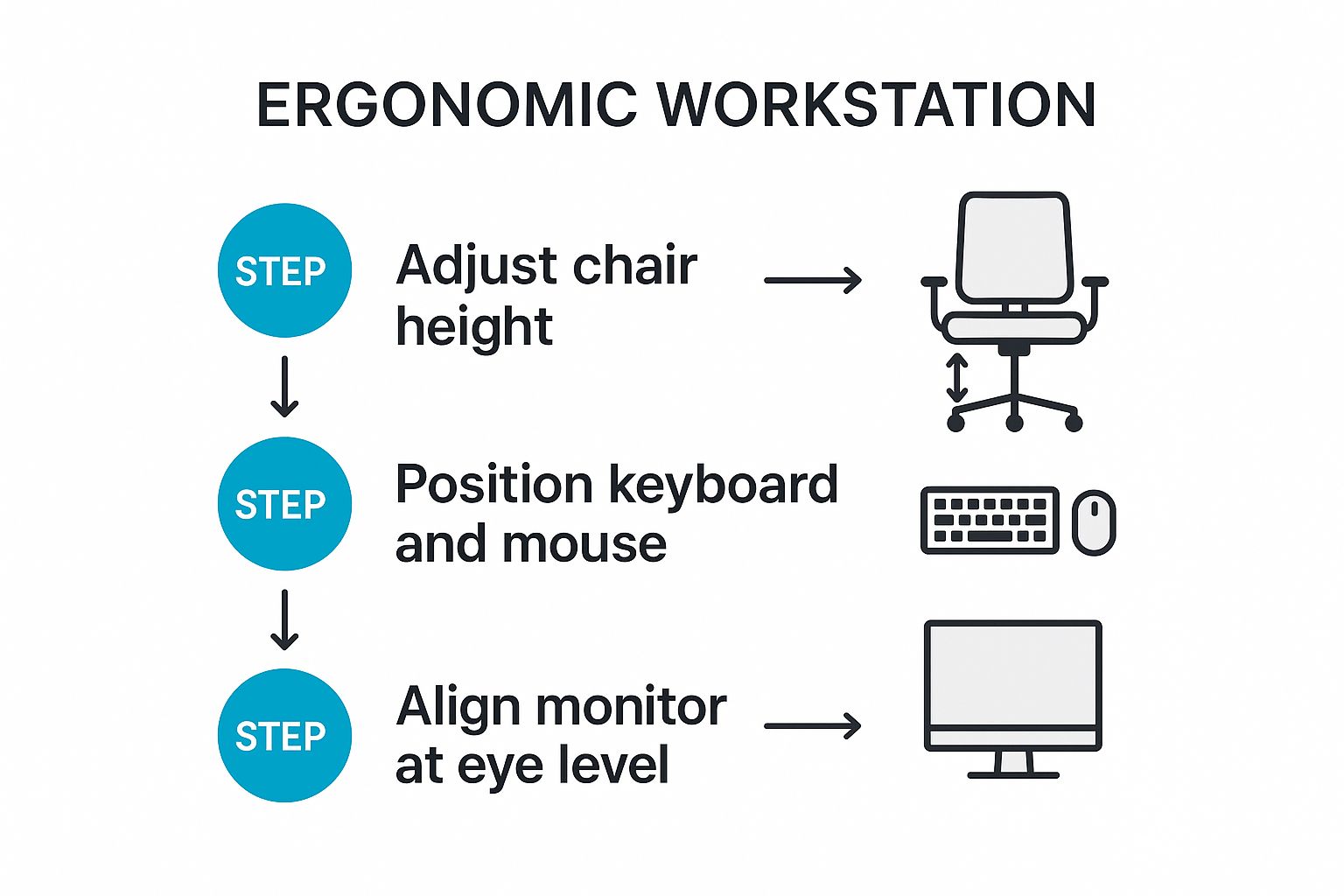
As you can see, a proper setup—from your chair to your screen or work surface—is the non-negotiable starting point. Good habits and stretches are far more effective when your body is already in a neutral, supported position.
Stretches You Can Do Right at Your Workstation
You don’t need a yoga mat or a special break room for these. They’re designed to be done right where you are, in just a few minutes. The golden rule is to be gentle; you're looking for a mild pulling sensation, never sharp pain.
For Your Hands and Wrists
Your hands and wrists are on the front line in the battle against RSI, so they need daily attention.
-
Wrist Extensor Stretch: Hold one arm out straight in front of you, palm facing down. Gently let your wrist drop so your fingers point to the floor. Use your other hand to apply light pressure to the back of the stretching hand, deepening that pull in your forearm. Hold for 15-20 seconds before swapping sides.
-
Wrist Flexor Stretch: Same starting position, but this time with your palm facing up. Bend your wrist down again, pointing your fingers to the floor. Use your other hand to gently pull your fingers towards your body. You'll feel this one on the underside of your forearm. Hold for 15-20 seconds and repeat.
-
Finger Tendon Glide: This one is brilliant for getting the tendons in your fingers moving through their full range. Start with your fingers straight out. Then, slowly move into a hook fist, followed by a full fist, and finally a "straight" fist where your fingers are flat against your palm. Cycle through these positions slowly to keep everything limber.
For Your Shoulders and Neck
Tension just loves to set up camp in the shoulders and neck, especially if you spend time leaning forward or looking down at your work.
-
Shoulder Rolls: Whether you’re sitting or standing, just lift your shoulders up towards your ears and roll them backwards in a big, slow circle. Do this 5-10 times. It feels amazing for releasing that upper-back tightness. Then, reverse it and roll them forwards.
-
Upper Trapezius Stretch: Let’s get that tight spot between your neck and shoulder. Gently tilt your right ear towards your right shoulder until you feel a stretch along the left side of your neck. If you want a little more, you can rest your right hand on your head, but don't pull—just let its weight add a tiny bit of pressure. Hold for a good 20 seconds, then slowly switch to the other side.
Simple 5-Minute Daily Stretching Routine
Here’s a quick reference table to make these stretches an easy part of your daily habit. Just a few minutes can make all the difference.
| Stretch/Exercise | Target Area | Instructions | Duration |
|---|---|---|---|
| Wrist Extensor Stretch | Top of Forearm | Extend arm, palm down. Bend wrist, fingers point down. Gently press with other hand. | 15-20 seconds per side |
| Wrist Flexor Stretch | Underside of Forearm | Extend arm, palm up. Bend wrist, fingers point down. Gently pull fingers toward you. | 15-20 seconds per side |
| Finger Tendon Glide | Finger Tendons | Cycle through: straight hand, hook fist, full fist, straight fist. | 5 slow cycles |
| Shoulder Rolls | Shoulders & Upper Back | Roll shoulders up, back, and down in a slow, large circle. Reverse direction. | 5-10 rolls each way |
| Upper Trapezius Stretch | Side of Neck | Gently tilt ear toward shoulder. Use hand for light pressure if needed. | 20 seconds per side |
Building these simple movements into your micro-breaks is one of the most powerful ways to stop RSI from taking hold. Try setting a reminder on your phone or computer to get up and stretch every hour. It’s a small investment of time that pays off massively for your long-term well-being.
Listening to Your Body and Taking Early Action

Your most powerful tool for preventing a repetitive strain injury isn't a fancy ergonomic device—it's your own body's feedback. Long before a chronic condition sets in, your body starts sending subtle warnings. The difference between a temporary ache and a long-term problem often boils down to one simple thing: listening and acting early.
It’s all too easy to brush these early signs aside. A bit of morning stiffness in the wrist, a dull ache in your shoulder you blame on sleeping funny, or a faint tingling in your fingers that you just shake off. We tell ourselves it's just "normal" fatigue from a hard day's graft. But learning to tell the difference between routine tiredness and the first whispers of RSI is a skill that can save you from years of pain.
Trust your gut. If a sensation feels new, persistent, or just wrong, it probably is. Ignoring it is like ignoring the oil light on your car's dashboard—you might get away with it for a while, but eventually, the damage becomes far more serious and costly to fix.
Recognising the Early Warning Signs
Your body has its own language for telling you something is amiss. Getting familiar with these signals means you can step in before the damage becomes ingrained. This isn't about becoming paranoid over every little twinge, but about spotting patterns.
Keep an eye out for these classic early symptoms:
- Tingling or Numbness: That "pins and needles" feeling, especially in your hands and fingers, is a classic sign that nerves might be getting compressed or irritated.
- Stiffness: You might notice it most in the morning or after a long break. If your joints feel stiff and take a while to "warm up," that’s a red flag.
- A Persistent Dull Ache: This isn't the sharp pain of a sudden injury. It's a low-grade, nagging ache in a muscle or joint that just doesn't seem to clear up with rest.
- Weakness or Clumsiness: Suddenly finding it harder to grip your tools? Dropping things more often? A noticeable loss of strength in your hands can be an early sign of muscle fatigue and nerve issues.
Your goal isn't to self-diagnose a specific condition, but simply to recognise that a pattern of discomfort is emerging. One off-day is normal; a week of the same nagging ache is a clear signal to do something about it.
What to Do When You Notice Symptoms
The moment you spot a persistent issue, it's time to act. Don't adopt a "wait and see" attitude, hoping it will just disappear. A clear, calm plan of action puts you back in control.
Start by making immediate adjustments to your work routine. Go back and re-evaluate your workstation using the ergonomic principles we’ve covered. Are you taking enough breaks? Are you doing your stretches? Often, small changes can provide instant relief and stop the problem in its tracks. If you find that stretching isn't cutting it or the discomfort lingers, professional physiotherapy can provide targeted advice and treatment.
If the symptoms hang around for more than a few days despite these changes, it's time to have a word with your manager.
Talking to Your Manager and Understanding Your Rights
Bringing up a health concern with your boss can feel intimidating, but it's a crucial step. A good manager would much rather know about a potential issue early on, so they can help prevent a serious problem that could lead to extended sick leave down the line.
Approach the conversation constructively. Explain the symptoms you're experiencing and the proactive steps you've already taken to sort it. Frame it as a way to ensure you can keep working safely and productively for the long haul.
It’s also important to be aware of your rights. Here in the UK, employers have a legal duty of care to their staff. With upper limb RSI affecting an estimated 450,000 UK workers, the law takes it very seriously. Under the 1992 Management of Health and Safety at Work Regulations, your employer is legally required to assess and control RSI risks.
This means you are well within your rights to request a formal workstation assessment or a referral to an occupational health specialist. This isn't about making a complaint; it’s about working together to find a solution that protects your long-term health. Taking early, decisive action is the best defence you have.
Clearing Up Common Questions About RSI
Even when you’ve got your workstation dialled in and you’re trying to build better habits, a few questions and myths about RSI always seem to pop up. Getting straight answers to these is key, as it helps you fine-tune your approach and feel more confident that you're on the right track. Let’s tackle some of the most common ones I hear.
Can I Still Get RSI with a Perfect Ergonomic Setup?
Yes, absolutely. It's a hard truth, but an ergonomic setup is just one piece of the puzzle. Think of it as the foundation, not the whole house. RSI is as much about how you work as it is about where you work.
You can have the best workbench and anti-fatigue matting in the world, but if you're gripping a tool with a white-knuckle grip for hours on end, or working with your shoulders tensed up, you're still paving the way for injury. The real secret is blending a great setup with smart work habits, regular movement, and consistent stretching.
How Often Should I Really Be Taking Breaks?
This is a big one. When it comes to breaks, frequency trumps duration, every single time. The goal isn't one long break to recover; it's to constantly interrupt the build-up of muscle tension before it becomes a problem.
For anyone on computers, the 20-20-20 rule is a fantastic place to start: every 20 minutes, look at something 20 feet away for 20 seconds. For your body, the aim is to get up and move for a minute or two every half an hour. Stand, stretch, walk to the other side of the workshop—it doesn't have to be long. This small but relentless effort is what stops fatigue and strain from taking hold.
Think of it this way: constant, low-level muscle tension is the primary fuel for RSI. Short, frequent breaks stop that tension from ever building to a dangerous level in the first place.
Are Standing Desks a Guaranteed Fix for RSI?
Standing desks are a brilliant tool, but they're no silver bullet. In fact, if you use them incorrectly, you can simply trade one set of problems for another. Standing perfectly still for hours on end can bring on a whole new world of foot, leg, and lower back pain.
The magic isn't in just standing; it's in the movement. A sit-stand desk that lets you easily change your posture throughout the day is the ideal solution. The real benefit comes from that regular transition. And remember, all the core ergonomic principles still apply whether you're sitting or standing – keep those wrists straight and your screen at eye level.
What Is the Difference Between RSI and Carpal Tunnel Syndrome?
This is a fantastic question because the terms get thrown around interchangeably all the time, but they aren't the same.
Here’s the simplest way to think about it:
-
Repetitive Strain Injury (RSI) is a broad umbrella term. It’s a descriptive category for pain and injury in the muscles, nerves, and tendons caused by overuse and repetitive tasks.
-
Carpal Tunnel Syndrome (CTS) is a specific, diagnosed medical condition that sits under the RSI umbrella. It happens when one particular nerve—the median nerve—gets squeezed as it passes through a narrow channel in your wrist (the carpal tunnel).
So, while repetitive work can cause Carpal Tunnel Syndrome, not all RSI is carpal tunnel. RSI can also manifest as other specific conditions like tendonitis, bursitis, or tennis elbow.
At TEMA Solutions Limited, we believe that a well-designed workspace is the cornerstone of preventing RSI. Our industrial workstations and storage solutions are engineered for ergonomic comfort and efficiency, helping your team work safely and productively. Explore our range of adjustable workbenches and smart storage options by visiting our official TEMA Solutions website.


