


Lean assembly performance is shaped by more than takt time, standard work and digital production data. The physical workstation is where those systems become reality. If tools are out of reach, components are poorly presented or the bench height cannot suit the operator, productivity and quality will suffer.
The LISTA move workstation system is designed around this principle. Its modular structure allows businesses to configure workstations around the operator, task, materials, equipment and production environment.
This article explains seven design principles for creating an ergonomic workbench that supports lean assembly, 5S, operator wellbeing and reliable point-of-use access.
Principle 1: Design the ergonomic workbench around reach zones
The problem
Many workstations are positioned around the room, available floor space or existing services. This often forces operators to reach across the bench, twist towards storage or leave the work area to collect tools.
Those movements may appear minor, but repetition creates motion waste and increases cycle time.
How it works
The LISTA move brochure identifies four access zones on the worktop:
- Work centre: both hands operate within the direct field of vision.
- Extended work centre: both hands can reach all areas without excessive movement.
- One-hand zone: tools and parts are easily reached with one hand.
- Extended one-hand zone: the outermost practical working area.
High-frequency tools, components and controls should occupy the work centre and extended work centre. Less frequently used items can move towards the outer zones.
This is the physical foundation of a lean assembly workstation. It applies the Pareto Principle by giving the most-used 20% of items the most accessible locations.
Practical tips
- Observe the operator rather than designing from a floor plan alone.
- Record the tools and SKUs used most frequently.
- Keep both-hand tasks directly in front of the operator.
- Place one-hand tools in clearly labelled containers or tool clips.
- Move low-frequency items to outer shelves or nearby cabinets.
Principle 2: Make height adjustment individual, not shared
The problem
A fixed-height bench assumes that every operator, task and product is identical. In a multi-shift environment, this can result in raised shoulders, bent backs, awkward wrist positions and prolonged static postures.
How it works
An ergonomic workbench should allow each operator to select a suitable working height for seated or standing work. The LISTA move guidance recommends that sitting phases should ideally last no longer than 30 minutes and standing phases no longer than 20 minutes. Continuous work should not exceed two hours seated or one hour standing without a change.
The objective is not to prescribe one posture. It is to provide controlled variation and allow operators to work comfortably according to the task.
LISTA move supports individual height adjustment, helping different users configure the same station without replacing the workstation.
Practical tips
- Trial the bench with actual operators and workpieces.
- Set higher positions for detailed precision tasks where appropriate.
- Use stable, lower positions for force-intensive activities.
- Include suitable seating, standing aids and leg clearance.
- Review the setup through the HSE’s workstation assessment guidance.
This is different from simply buying an adjustable bench. The focus is the layout and working routine that make adjustment useful.
Principle 3: Build the workstation from three interchangeable elements
The problem
A workstation becomes difficult to adapt when the frame, accessories and worktop are treated as one fixed product. Changing the process may then require replacing the complete bench.
How it works
LISTA move uses three independently configurable elements:
- Substructure
- Universal superstructure
- Countertop
This modular workstation system allows each element to be selected, expanded or replaced according to operational requirements.
The substructure options include:
| Substructure | Capacity | Lift range | Stroke | Lift speed | Module depths | Best suited to |
|---|---|---|---|---|---|---|
| LISTA Solo | 200 kg | 710–1,210 mm | 500 mm | 30 mm/s | 625, 675, 725 mm | Individual light-to-medium assembly |
| LISTA Duo | 400 kg | Configuration dependent | Configuration dependent | Configuration dependent | Modular depths | Heavy-duty work and mobile applications |
| LISTA Quattro | 400 kg | 680–1,180 mm | 500 mm | 30 mm/s | 675, 725, 925 mm | Electrically adjustable heavy-duty workstations |
The Duo can be specified with a foldable bogie to increase legroom and mobility. For team workstations, up to four legs or eight lifting columns can be linked. Wider Quattro benches can also use synchronous lifting control.
Practical tips
- Specify the frame around the total static and dynamic load.
- Confirm depth requirements before adding cabinets or equipment.
- Leave capacity for future tools, fixtures and test equipment.
- Use linked columns where a team shares one wide work surface.
- Consider mobility if the workstation supports changing production layouts.
Principle 4: Choose the worktop for the task
The problem
A worktop selected from a catalogue may be unsuitable for the environment. Impact, chemicals, soldering heat, cleaning requirements and ESD controls all affect the correct specification.
How it works
LISTA move offers ten standard worktop materials:
- Multiplex
- Beech
- Metal coating
- Eterlux
- Resin
- Melamine
- Universal
- Nitrile
- ABS
- PVC mat
These materials vary in impact resistance, scratch resistance, dampening, cleanability, hygiene, heat resistance and resistance to chemicals, acids, alkalis, oil and grease.
Four standard widths and four standard depths are available, with special dimensions, shapes and notches available when required. Top joints can also create large, seamless work surfaces.
Practical tips
- Use metal-coated surfaces for heavy-duty industrial work.
- Select multiplex for general workshop and assembly applications.
- Consider Eterlux, resin or melamine for laboratory and office environments.
- Use resin where soldering heat or chemical exposure is expected.
- Specify nitrile or PVC surfaces where oil and component protection are priorities.
For wider buying considerations, see TEMA’s guides to industrial workbenches and adjustable-height workbench benefits.
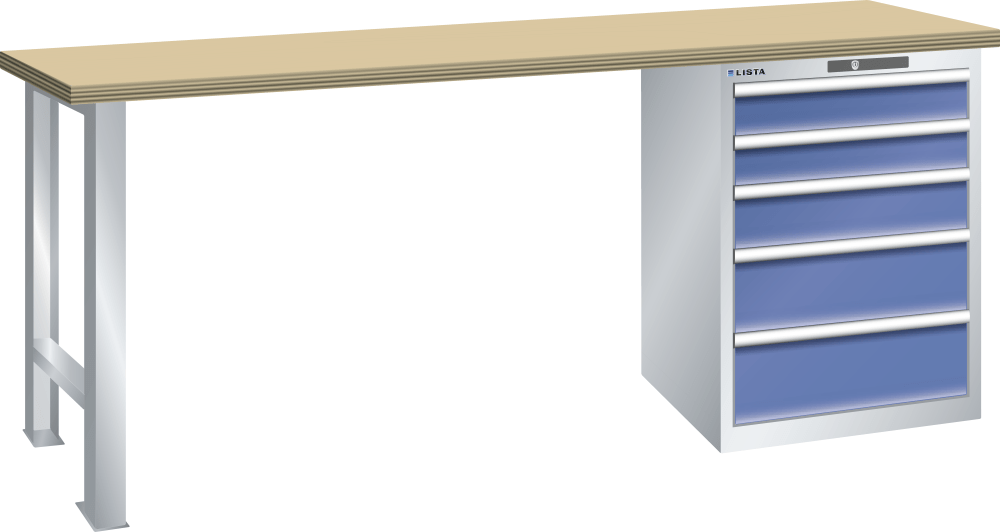
Principle 5: Use the superstructure to bring tools, power and data to the operator
The problem
A workbench can have the correct height and surface but still create waste if tools, lighting, power and information are positioned poorly.
How it works
The LISTA move superstructure can include plain or square-perforated rear panels in 200, 350 and 500 mm heights. Adjustable shelves are available in 200, 300, 350 and 400 mm depths, with dividers in 100, 150 and 200 mm widths.
Other accessories include:
- Container strips and storage containers in six sizes and four colours
- Tool clips with tool-free installation
- Swivel arms
- Monitor brackets
- Rail adapters and support bases for vertical support pillars
- LED lighting in 450, 900 and 1,500 mm lengths
- Articulated LED heads
- A dimmable LED magnifier lamp with a 160 mm diameter and 3.5 dioptres
Power and data can be integrated into the power conduit, including 230 V sockets, USB-C charging up to 20 W, RJ45 network sockets, RECTUS-compatible compressed air connections, emergency stop controls, RCD protection and circuit breakers.
Practical tips
- Position monitors and instructions in the normal field of vision.
- Place frequently used tools between the work centre and one-hand zone.
- Use colour-coded containers for visual identification.
- Specify lighting according to inspection and assembly detail.
- Plan compressed air, power and data before installation.
An ergonomic workbench should reduce both physical movement and information friction.
Principle 6: Build 5S into the furniture
The problem
5S programmes often fail when they rely solely on operator discipline. If the workstation has no defined storage locations, labels or visual controls, sustaining order becomes unnecessarily difficult.
How it works
LISTA move supports the five stages of 5S:
- Sort: remove obsolete tools, damaged parts and unnecessary materials.
- Set in order: give every tool and component a defined location.
- Shine: make cleaning and inspection accessible.
- Standardise: repeat the same layouts, labels and colour conventions.
- Sustain and self-discipline: audit the arrangement and correct drift.
Container strips, adjustable shelves, dividers, swivel arms, labels and coloured storage containers make 5S structural rather than procedural.
This directly reduces motion waste. Operators should not need to search through several drawers for a regularly used item, and missing tools should be immediately visible.
Practical tips
- Use drawer dividers for repeatable component locations.
- Label locations by tool number, SKU or process step.
- Apply shadow boards or visual outlines to high-use tools.
- Keep quarantine, inspection and available stock separate.
- Review the layout during regular 5S audits.
Principle 7: Specify the workstation for its environment
The problem
A standard workstation may be unsuitable for electronics, laboratory work, clean manufacturing or processes involving static-sensitive components.
How it works
ESD means electrostatic discharge. It can damage electronic components and cause immediate or latent failure. In an ESD Protected Area, the work surface, operator, equipment and storage must dissipate charge through a controlled grounding arrangement.
An ESD workstation should include:
- A dissipative worktop
- A single grounding cable or common grounding point
- ESD flooring or suitable mats
- Wrist straps and grounding cables
- Antistatic footwear
- ESD clothing where required
- ESD chairs and standing aids
- Dissipative storage containers, cabinets and shelving
- Clear ESD warning symbols
LISTA move components are available as ESD models, including ESD worktops and suitable storage. The ESD Association standards guidance explains why a complete ESD control programme is more important than an isolated “anti-static” product.
For further planning, see TEMA’s ESD workstation buying guide.
Practical tips
- Identify the most sensitive component handled at the station.
- Include storage and personnel grounding in the original specification.
- Keep unsuitable plastics and packaging outside the EPA.
- Test and document grounding arrangements.
- Train operators, contractors and temporary staff.

Versatile applications for LISTA move
The same modular system can be configured for:
- Testing and laboratory workstations
- Office workstations
- Lean testing workstations
- Individual assembly workstations
- Corner solutions
- Linked workbenches
- Cable assembly workstations
Linked lighting and system power strips help create continuous work areas. Synchronous control of Quattro lifting columns supports wider benches without forcing operators to work around uneven height adjustment.
This flexibility makes LISTA move suitable for production facilities that need to standardise workstation design while allowing each cell to reflect its specific process.
Buying criteria and specification checklist
Before specifying an ergonomic workbench, document:
- Operator numbers, shift patterns and seated/standing requirements
- Reach zones and high-frequency tools
- Worktop width, depth, material and load
- Substructure capacity and lifting range
- Drawer, shelf and container requirements
- Power, data, lighting and compressed air needs
- ESD, laboratory, cleanroom or chemical requirements
- Future expansion and linked workstation requirements
- Installation, maintenance and verification needs
LISTA has more than 75 years of experience, dating back to 1945, with manufacturing in Erlen, Switzerland and Bergneustadt, Germany. LISTA products are backed by a 10-year guarantee. TEMA also supplies Thurmetall products with a five-year warranty, while workbench tops and electronic parts carry a one-year warranty. Relevant quality systems include ISO 9001, ISO 14001 and ISO 45001.
Implementation roadmap
Use a controlled pilot rather than changing an entire production area at once:
- Audit one cell: record retrieval time, walking, reach frequency and reported fatigue.
- Map the work: place tools and components according to the four access zones.
- Configure the system: select the substructure, worktop, superstructure, storage and services.
- Pilot with operators: test the workstation during normal production.
- Measure results: compare retrieval time, errors, output and fatigue indicators.
- Standardise: apply the proven design across comparable workstations.
The LISTA configurator at configurator.LISTA.com provides a practical next step for developing a suitable configuration.
Key takeaways
- Design the workstation around the operator’s reach zones, not the room.
- Make height adjustment individual and support controlled posture variation.
- Treat the frame, superstructure and worktop as interchangeable elements.
- Choose the surface for the task and environment.
- Integrate tools, power, data and lighting into the workstation.
- Make 5S part of the furniture layout rather than an afterthought.
- Specify ESD as a complete system covering the operator, bench, storage and floor.
- Pilot one cell, measure performance and standardise what works.
A well-designed ergonomic workbench is a critical foundation for lean assembly. It reduces motion waste, supports safer working positions and makes physical organisation the bedrock of digital production efficiency.
TEMA Solutions can help configure LISTA move workstations around your operators, tools, processes and environment. Explore the workshop storage systems, mobile workbench, tool cabinets on wheels and LISTA tool box ranges, or visit the TEMA Solutions shop.
Start with one high-friction assembly cell and design the next ergonomic workbench around the way your team actually works.


